
ATS CV optimiser that rewrites your CV to pass screening
Upload your CV and the job description. EnDev scans them together, scores your ATS match and rebuilds your CV into a structured document designed to pass applicant tracking systems.
The process
How the ATS CV optimiser works
Upload your CV
Upload your CV as a PDF so the engine can read your experience.
Add the job description
Paste the target job description or role description so your CV is checked against what the employer is asking for.
Get your ATS score and rewrite
See your ATS match percentage and the critical fixes, then have your CV reconstructed into a structured, ATS-passable document.
Inside the app
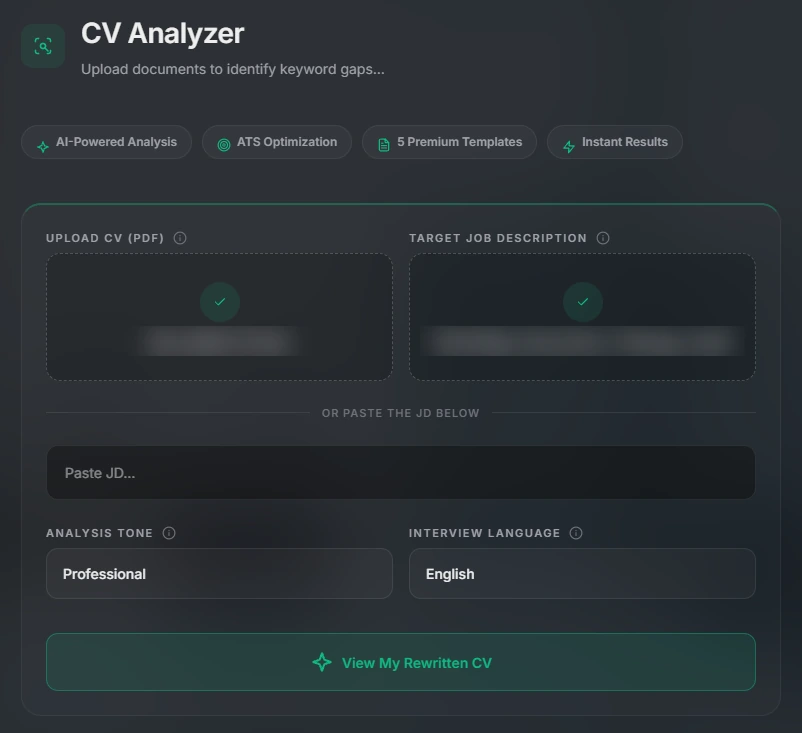
Upload, add the job description, scan
Upload your CV, upload or paste the target job description, choose an analysis tone and language, then view your rewritten CV.
What it does
More than a keyword checker
Scan and score
Deep CV auditThe engine analyses your CV against the job description and shows an ATS match percentage with the critical patches to apply.
Reconstructed, not just edited
Full ATS rewriteYour record is re-engineered into a structured document aligned to your target role and designed to pass automated screening.
Better bullet points
The VaultPaste raw career memories and the AI turns them into polished, impact-driven achievements with quantified results.
ATS guide
What applicant tracking systems look for
Most applicant tracking systems parse your CV into fields such as job titles, employers, dates and skills, then compare the content with the job description. These habits help your CV survive that process:
- Mirror the job description. Use the same terms for skills and tools that the advert uses, where they are true for you.
- Use standard headings. Headings such as Experience, Education and Skills are easy for software to recognise.
- Keep the layout simple. Complex tables, columns, text boxes and graphics can confuse parsers.
- Show results. Quantified achievements stand out to both software and recruiters.
- Tailor every application. One generic CV rarely matches every role. Re-check it for each job.
EnDev applies these principles for you when it rebuilds your CV for a specific role.
Pricing
Pay only for what you use
A full ATS CV rewrite costs an estimated 15 credits and a Vault story transformation about 5 credits. Credits never expire.
| Pack | Price | Credits | Cost per credit |
|---|---|---|---|
| Starter Pack | £4.99 | 50 credits | 9.98p |
| Career Pack | £12.99 | 150 credits | 8.66p |
| Master Pack | £24.99 | 350 credits | 7.14p |
FAQ
ATS CV optimiser questions
An ATS (applicant tracking system) is software that employers use to collect, filter and rank applications. If your CV is structured in a way the software cannot read, or it lacks the keywords from the job description, it can be filtered out before a person ever sees it.
Yes. The Deep CV Audit Assembly Engine does not just fix typos. It re-engineers your record into a structured, ATS-passable document aligned to the job you are targeting.
Upload your CV as a PDF and paste the target job description or role description. EnDev scans the two together to extract the ATS-critical changes.
A full ATS CV rewrite costs an estimated 15 credits. Credit packs start at £4.99 for 50 credits and never expire. The actual deduction depends on the features you use.
Yes. The Vault turns raw, unstructured career memories into polished, impact-driven achievements with quantified results, which you can use in your CV and in interview answers.
Get your CV past the software
Scan your CV against a real job description and let EnDev rebuild it. Credit packs start at £4.99.